
Wheelz - Social Drive Tracker
Vortac Labs IncMaps & Navigation
4.812.00 Reviews
- Version
- 4.2
- Installs
- 10.00K
- Age Rating
- Everyone
Screenshots
Our Review of Wheelz - Social Drive Tracker
 Analysis by Appyee
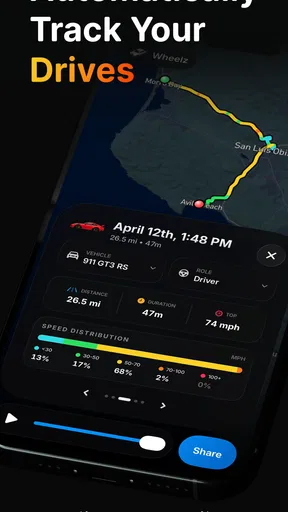
I spent time with Wheelz - Social Drive Tracker as a driving companion rather than treating it like another turn-by-turn navigation app. That distinction matters. Its focus is on recording drives, sharing them with friends, watching speed, and keeping an eye on mileage. I found the idea most useful when I wanted a simple record of a trip or a more social way to talk about driving, not when I needed detailed route planning.
Wheelz is a free Maps & Navigation app from Vortac Labs Inc, with an Everyone age rating. The current release is version 4.2 and it works on Android 8.0 or later. Its average score is 4.8 from around 749 ratings, while the app has passed 10K installs. Those figures suggest a small but highly positive user base, so I would treat the rating as encouraging rather than as proof that it will suit every driving style.
How Wheelz fits into a real driving routine
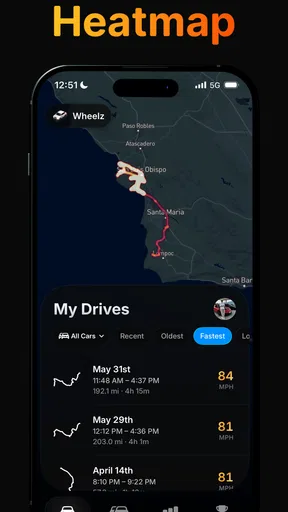
The first thing I noticed is that the app makes more sense as a personal driving log with social elements than as a replacement for Google Maps, Apple Maps, or a dedicated navigation service. Those familiar tools are built around getting somewhere efficiently. Wheelz is built around the drive itself: recording it, sharing it, checking speed, and building a mileage history.
That makes the app relevant to several everyday situations. I can imagine starting a drive before leaving for work, checking the speedometer during a long stretch of road, and later looking back at the distance covered. A weekend group drive is another natural fit: the social side gives the trip a shared identity instead of leaving every participant with a separate memory of the same route.
There is also a practical use for people who regularly drive but do not want a complicated vehicle-management system. A freelancer visiting clients, a family tracking road-trip mileage, or someone monitoring personal driving habits may appreciate having one place for drive records and mileage. The important point is to use it as a companion while parked or before moving, rather than interacting with a phone while driving.
What the free access actually means
The app is free to download, which makes trying it straightforward. That is the clearest part of its value: you can see whether its drive tracking and social approach fit your routine before committing money. I would begin with a few ordinary journeys rather than judging it after one short test, because a tracking app becomes useful only when its records reflect the way you actually travel.
Wheelz also includes optional in-app purchases ranging from $2.99 to $39.99 per item. I would not automatically treat those purchases as necessary. The free entry point is valuable on its own, while the paid side should be judged by whether it adds something you will use repeatedly. A person who only wants occasional mileage records may get enough from free access; a frequent driver may find a paid upgrade more worthwhile if it improves the parts of the experience they use every day.
Because the available purchase range covers both a small one-off amount and a much larger item, I would check each purchase screen carefully before confirming anything. The sensible approach is to identify the exact benefit attached to an item and compare it with your driving frequency. Paying for a feature you open once a month is difficult to justify, while paying for a tool that becomes part of every trip can be reasonable.
Where the app delivers useful value
The strongest value comes from combining functions that are often scattered across different apps. A normal navigation app may get you to a destination, but it is not always the place you would choose for a personal mileage record. A standalone speedometer may show speed, but it does not necessarily give the same drive-centered context. Wheelz brings those ideas together with sharing, which gives it a more focused identity.
I especially like the possibility of separating “where I am going” from “what I want to remember about the drive.” For a commute, navigation is usually the priority and the trip may feel routine. For a scenic outing, a road trip, or a group meet-up, the record itself becomes more meaningful. This is a subtle difference, but it explains why someone might keep Wheelz installed even while continuing to use a traditional navigation app.
A useful workflow is to use a navigation app for directions, then use Wheelz for the drive record and social side. That avoids forcing one application to do everything. It also reflects the app’s real strength: it is not competing only on maps; it is offering a driving log with a social layer and a speedometer.
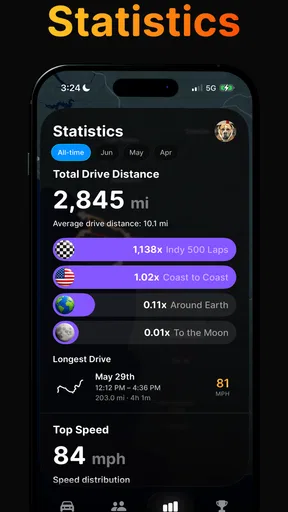
Another practical insight is that mileage tracking can help with decisions that are easy to ignore when trips remain informal. After several weeks, a driver may notice how much distance comes from errands, commuting, or recreational drives. That record can support better planning, even if the app is not a full vehicle maintenance or expense-management system. I would use the mileage history as a prompt for reflection, not as the sole source for financial or service records.
Sharing drives without making the app feel noisy
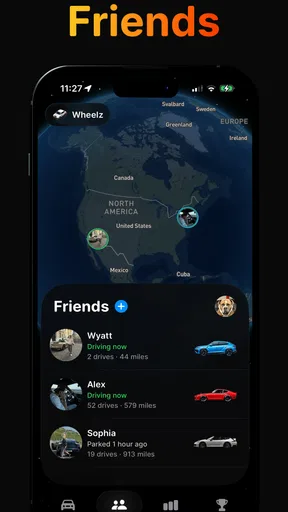
The sharing feature is most appealing when it has a clear purpose. For a group drive, sharing can help friends stay connected to the same outing. For a personal commute, sharing every trip may add little value and could make the social side feel distracting. I would be selective: share journeys that are genuinely interesting, useful, or part of a plan with other people.
That selective approach is one of the easiest ways to get more from Wheelz. Instead of treating every recorded drive as something that must be published, I would keep routine tracking personal and reserve sharing for road trips, meet-ups, or drives where friends would appreciate the context. This keeps the social feature useful rather than turning it into background clutter.
The app’s social angle may also appeal to drivers who enjoy comparing experiences without needing a formal club or a large community. At the same time, people who prefer a completely private driving log may find the emphasis less relevant. If your ideal tracker is silent, local, and purely functional, a basic mileage tool could be a better match.
Speedometer use and the safety trade-off
A built-in speedometer is convenient because it keeps a driving-related tool close to the rest of the trip record. I can see why someone would want that during a drive where the vehicle’s own display is difficult to read or when a quick reference is useful. However, convenience should never encourage phone handling in motion. Set up the app before departure, mount the device safely if you use it as a display, and rely on the vehicle’s instruments and local road rules first.
This is also where expectations need to stay realistic. A phone-based speed display can be a helpful companion, but I would not treat it as a substitute for the car’s speedometer or as a reason to keep looking down at the screen. The feature adds value when it is passive and prepared in advance. It loses value if using it requires repeated adjustments while driving.
For new drivers, parents, or anyone trying to build safer habits, the speedometer should be viewed as an awareness aid, not a game. Wheelz is better suited to calm, hands-off monitoring than to active interaction. That distinction is important because the app’s driving focus can be useful only when it stays secondary to safe attention on the road.
Small workflows that make the app more practical
My preferred setup would be to decide before leaving whether the trip is mainly for logging, sharing, or both. That simple choice prevents unnecessary interaction once the car is moving. For a commute, I would start the record and leave the phone alone. For a group outing, I would prepare the sharing side before departure and avoid turning the trip into a live social task.
I would also review mileage at a regular, calm moment rather than after every arrival. Looking at individual trips can be interesting, but patterns become more useful when several journeys are viewed together. A weekly check can reveal whether Wheelz is helping you understand your driving or whether you are collecting records without doing anything with them.
A third useful habit is to keep navigation and tracking roles separate. If I need complex directions, traffic information, or destination search, I would use the navigation app I already trust. I would let Wheelz handle the drive-centered record. This two-app workflow may sound less elegant than an all-in-one solution, but it is often more reliable because each app is being used for what it does best.
Finally, I would test the app on a familiar route before relying on it for a long trip. That gives you a chance to learn how starting and ending a drive feels, how much attention the interface demands, and whether the mileage record matches your expectations. Familiar roads are the right place to discover friction; an unfamiliar route is not.
Where the usual alternatives are stronger
Traditional navigation apps remain the better choice when the main question is “How do I get there?” They are generally the natural starting point for route guidance, destination searches, and navigation habits people already understand. Wheelz does not need to replace them to be useful, but it also should not be judged as though it were primarily a route-planning product.
A simple mileage tracker may be preferable for someone who wants the smallest possible workflow. If you only need distance records and have no interest in sharing drives or viewing speed, Wheelz’s broader focus may feel unnecessary. In that case, fewer features can be an advantage because there is less to configure and less social context to ignore.
Likewise, a dedicated vehicle log or expense app may suit drivers who need detailed business records, fuel entries, service reminders, or reimbursement paperwork. Wheelz’s appeal is narrower and more approachable: it connects drive tracking, mileage, speed, and friends. I would choose it for experience and convenience, not for formal accounting.
The trade-off is therefore clear. Wheelz offers more personality and social usefulness than a bare mileage counter, but it may not provide the depth of a specialized driving-management system. It sits between a navigation companion and a personal drive journal, which is exactly why it will feel distinctive to some people and unnecessary to others.
Who will get the most from it
I think Wheelz is a strong fit for people who enjoy road trips, group drives, or keeping a record of where their vehicle takes them. It also makes sense for drivers who want mileage tracking without beginning with a complex professional logbook. Since the app is free to start, curious users can test that fit without paying at the door.
It may be particularly useful for someone whose driving has a social or recreational side. A weekend driver, a road-trip planner, or a person who regularly meets friends for drives can make meaningful use of sharing in a way that a routine commuter may not. The app becomes more valuable when the journey itself matters, not just the arrival time.
It is less convincing for someone who wants only turn-by-turn directions, a private minimalist counter, or formal mileage documentation. I would also skip it if you know that extra dashboard features encourage you to touch your phone while driving. No tracking convenience is worth compromising attention on the road.
People considering paid items should ask themselves one practical question: will I use the added value often enough to notice it? The free version provides a low-risk starting point, while the in-app purchase range means the paid decision deserves care. I would use the app first, establish a routine, and only then decide whether an optional purchase solves a real problem.
My final recommendation
Wheelz succeeds because it gives driving a different center of gravity. Instead of focusing only on arrival, it treats the journey as something to record, share, and understand through mileage and speed. I found that approach more interesting than a generic navigation clone, especially for recreational driving and trips shared with friends.
Its limitations are just as important. It is not the app I would choose as my only navigation tool, and it is not automatically the best option for professional mileage administration or a completely stripped-down log. The social features will feel useful to some drivers and irrelevant to others. The speedometer is convenient only when used safely and with minimal interaction.
My verdict is to try the free version if you want a social drive log rather than another map. Give it several familiar journeys, decide whether the mileage record and sharing workflow genuinely fit your habits, and treat paid items as optional upgrades rather than a requirement. For road-trip enthusiasts and socially minded drivers, Wheelz has a clear reason to exist. For drivers who want directions alone, a simpler or more established navigation alternative will probably be the better choice.
Overall, Vortac Labs Inc has created an app with a focused identity: a driving companion for people who care about the trip as much as the destination. That is a narrower audience than the entire navigation market, but for the right driver, it is also the reason the app feels worth keeping.
Verdict
Strengths of Wheelz - Social Drive Tracker
- Tracks drives with useful distance and route statistics.
- Social features make sharing driving experiences easy.
- Clean interface is simple to understand and navigate.
- Can help users review driving habits over time.
- Suitable for casual drivers and automotive enthusiasts alike.
Limitations of Wheelz - Social Drive Tracker
- Background GPS use may reduce battery life during longer drives.
- Accuracy can vary in tunnels, garages, or areas with weak signal.
- Social sharing may raise privacy concerns for some users.
- Some features may require account registration or permissions.
- Limited value if you rarely drive or do not use tracking tools.
Similar Picks in This Category
View All
Uber - Request a ride
Uber Technologies, Inc.4.7


inDrive. Rides with fair fares
® SUOL INNOVATIONS LTD4.8

Yandex Go: Taxi Food Delivery
Mikromobilnost LLC Belgrade4.8

Bolt: Request a Ride
Bolt Technology4.8

Rapido: Bike-Taxi, Auto & Cabs
Rapido Bike Taxi4.8
Frequently Asked Questions
What is Wheelz - Social Drive Tracker and what does it do?
Wheelz - Social Drive Tracker is a social driving application designed to help users record, organize, and share information about their drives. Depending on the features available in your region and device, it may let you track routes, driving activity, vehicle-related details, and personal statistics while connecting with other drivers. It is best suited to people who enjoy monitoring journeys and discussing driving experiences with a community.
Does Wheelz track my location while I am driving?
The app may use GPS and location services to record routes, distances, and other driving information. Before using it, review the location permissions carefully and check whether tracking can run in the background. You should also examine the privacy settings for sharing trips or profile information. Avoid using the app manually while driving, and only interact with it after parking safely.
Can I use Wheelz without creating an account or sharing my drives?
Some features may be available without a full public profile, but social functions, saved driving history, leaderboards, or community interaction may require registration. Availability can vary by app version and platform. If privacy is important to you, check the sign-up process and visibility controls before recording a trip, since shared routes or vehicle information could reveal personal habits or frequently visited locations.
Is Wheelz - Social Drive Tracker free to download and use?
Wheelz may be free to download, but the overall experience can include optional purchases, premium functions, advertising, or subscription-based features. The exact pricing and available tools should be confirmed on the Google Play Store or Apple App Store listing for your country. Be especially careful when starting a trial, because subscriptions can renew automatically unless canceled through your device’s account settings.
What should I check before downloading and using Wheelz?
Before installing Wheelz, confirm that your Android or iPhone meets the app’s current requirements and that you have enough storage and battery capacity for GPS-based tracking. Read the latest privacy policy, permission requests, and user reviews, particularly comments about battery consumption, connection stability, and tracking accuracy. Also verify whether the app supports your vehicle, region, and preferred social features.
